NyhetsrumNyhet
Nytt verktyg och vassare Krymp
Krymp har blivit snabbare, smartare, enklare och fått ett nytt verktyg — Moodboard. Här är allt som är nytt.
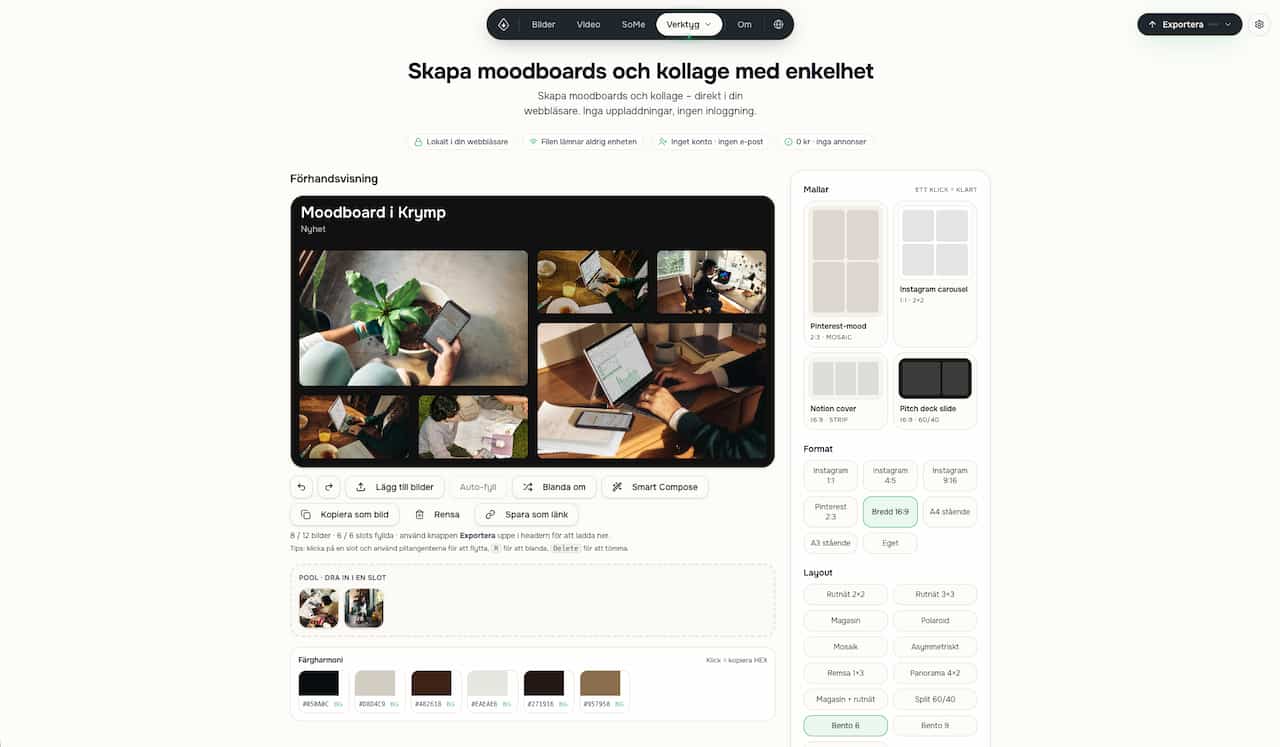
Krymp har blivit snabbare, smartare, enklare och fått ett nytt verktyg — Moodboard. Nu har Krymp blivit ännu vassare. Här är nyheterna.
Smartare bildkomprimering
Krymp bilder till exakt målstorlek, till exempel 100 kB eller 1 MB. Med live-preview ser du direkt hur kvaliteten påverkas.
HEIC direkt från iPhone
Ladda upp bilder från mobilen utan krångel.
Klistra in med ⌘V eller Ctrl+V
Snabbare flöde när du jobbar med screenshots, bilder och filer.
Snabbare Some-export
Exporten är rejält mycket snabbare. Från lång väntan till betydligt smidigare arbetsflöde.
En exportknapp som faktiskt känns logisk
Samma Exportera-knapp finns nu i princip överallt, med tydlig progress, ZIP-stöd och bekräftelse innan tunga jobb.
Bättre mobilupplevelse
Renare gränssnitt, större klickytor, smidigare inställningar och enklare filhantering.
Vassare Markdown-editor
Med zen-läge, diagram, matte, tabeller, checklistor, bilder och sök/ersätt.
Moodboard — nytt verktyg
Ett helt nytt verktyg för att snabbt skapa snygga visuella boards med layout, färger, typografi och JPG-export.
Från Norrhavet-portföljen